Bring back the file someone deleted.
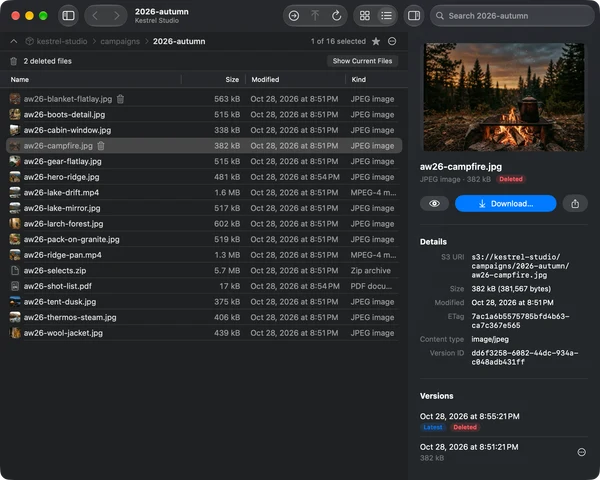
On a versioned bucket, Show Deleted Files lists what’s gone and Restore puts it back. Each file’s history opens in the Info panel, and Browse As Of shows a folder as it was on any date.
Browse, preview, share and restore files in Amazon S3, MinIO and other S3‑compatible storage, in a native Mac app that stays read-only until you allow changes.
Version 0.3.0 · Free and open source · macOS 26 or later · Signed and notarized
Live-tested with Amazon S3, Cloudflare R2, Garage, MinIO, RustFS and SeaweedFS

On a versioned bucket, Show Deleted Files lists what’s gone and Restore puts it back. Each file’s history opens in the Info panel, and Browse As Of shows a folder as it was on any date.
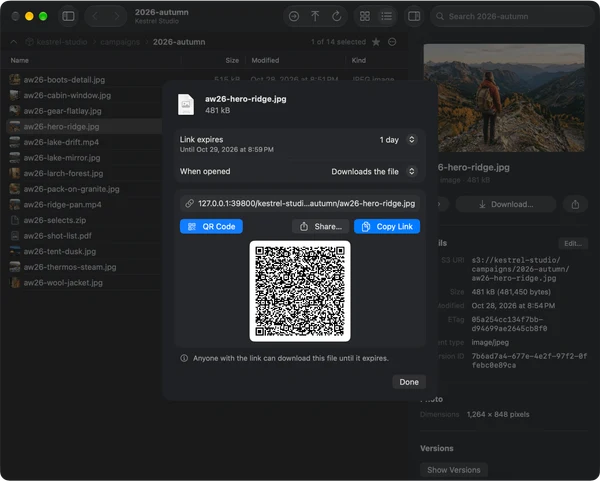
Create a presigned link that works for 15 minutes up to 7 days. It’s signed on your Mac, so no server sees your keys. Copy it, share it, or scan its QR code with your phone.
Storage Overview draws any bucket or folder as a treemap by size and kind, with its storage classes and largest files, so two weeks of database backups stand out at a glance.

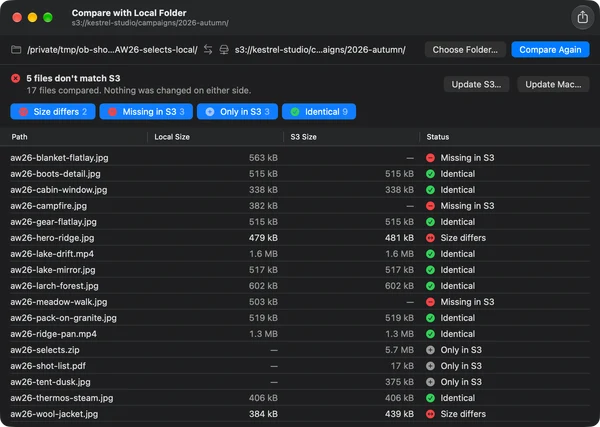
Compare with Local Folder matches files by path, size and checksum, then updates S3 or your Mac with only what’s new or changed. Nothing is deleted on either side.
Real Bucketdeck windows, connected to local Garage and MinIO servers with demo files.
Bucketdeck uses SwiftUI and the macOS 26 look, and it works with the parts of macOS you already know.
Press Space or ⌘Y to Quick Look images, video and documents straight from the bucket.
Favorite folders show up in Spotlight. App Intents open locations and copy share links.
Open s3:// links from any app, or paste an S3 console URL into Go to Location.
⌘1 and ⌘2 switch grid and list, ⌘↑ goes up a folder, ⌘F finds, ⌥⌘I shows Info.
⌘A, ⇧-click and ⌘-click in grid and list. Drag files straight out to Finder.
Files, selections and whole folders up and down side by side, with progress and cancel. Large files go in parts.
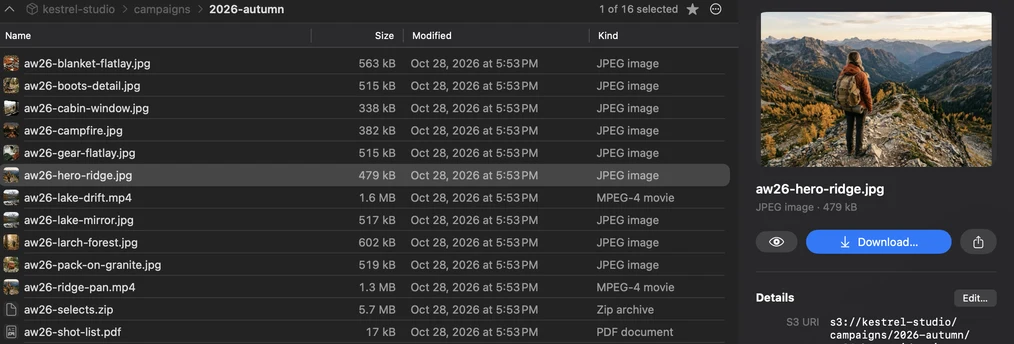
Every connection starts read-only. Uploads, moves, renames and deletes appear only after you turn on Allow changes for that connection, and Bucketdeck checks the setting again before each change.
Connection settings hold only a reference to your credentials.
Compare updates new and changed files only. A replaced file on your Mac goes to the Trash.
Share links are signed on your Mac and stop working after the time you choose.
Bucketdeck is licensed under the GNU GPL v3 and built in the open with Swift 6, SwiftUI and Soto. Every release is signed with a Developer ID, notarized by Apple, and published with its SHA-256 checksum.
Yes. Bucketdeck is free and open source under the GNU GPL v3. Every release is signed with a Developer ID and notarized by Apple.
Yes. OpenBucket was renamed Bucketdeck in version 0.3.0. Your connections and settings carry over, and the Homebrew cask openbucket now installs Bucketdeck.
Browsing and changing files pass live tests on Amazon S3, Cloudflare R2, Garage, MinIO, RustFS and SeaweedFS. Backblaze B2, Wasabi, DigitalOcean Spaces and Hetzner Object Storage have ready-made endpoint settings, but none of those has a live test result yet.
Every connection starts read-only. Uploads, moves, renames and deletes only appear after you turn on Allow changes for that connection, and Compare with Local Folder never deletes files on either side.
Access keys and session tokens you enter are stored in the macOS Keychain. You can also sign in with a named AWS CLI profile, including roles and IAM Identity Center after aws sso login.
Yes. Set Known bucket in the connection, and optionally a starting folder, to browse without permission to list every bucket in the account.
No. Bucketdeck is a browser: it doesn’t mount buckets or sync in the background. Compare with Local Folder updates S3 or your Mac once, when you ask.
macOS 26 or later, on Apple silicon and Intel Macs.
Yes. Run brew trust koative/tap once, then brew install --cask koative/tap/bucketdeck. The cask follows each new release.
Or with Homebrew: brew install --cask koative/tap/bucketdeck
Version 0.3.0 · Free and open source · Issues and ideas on GitHub